
You want new shoes. Your card is close to its limit. So you tap “buy now, pay later” at checkout and split the cost into four small payments instead. That’s what drives most searches for “buy now pay later app comparison,” and it’s precisely why such apps have made their presence felt at almost every checkout point, whether it be for apparel or food delivery services. Not all of these apps function in the same manner, however; some verify your credit, others don’t. Some come with surprise charges in case of delayed payments. Following is the comparison of the six most popular apps, which can help you make a choice depending upon your budget. How Does Buy Now, Pay Later Work? Most buy now, pay later apps split a purchase into four equal payments. You pay the first one today. The rest come out every two weeks, usually pulled straight from your debit card or bank account.When you pay on time, there is no extra cost owed. Missing a payment may result in a fine from certain applications or being reported to a credit bureau. The credit card offers you an ongoing credit line that never expires. A BNPL plan is different. It’s tied to one purchase with a clear end date, which makes it easier to track on its own. However, the caveat is that nothing will prevent you from having up to three or four accounts open simultaneously, which makes it difficult to keep track of what you owe. Affirm vs Klarna vs Afterpay: What Sets Them Apart Affirm runs a soft credit check on every purchase and shows you the exact interest rate up front. However, while some programs charge no interest, there are others with an APR of as high as 36%. Hence, it may be advisable to check out the terms of the agreement before confirming. Affirm usually works well for large purchases such as furniture or electronics since it has longer payment terms than the other programs mentioned here. Klarna allows you more payment methods; you can split your purchases into four installments, repay them within 30 days, or go for a longer monthly plan. It also has its own shopping app where you can browse through partner shops and, thus, is a good option if you regularly do your shopping online. Afterpay keeps it simple: four payments, every two weeks, no interest, period. There’s no long-term financing option here, and honestly, that’s not a bad thing if you’re trying to avoid stretching payments out for months. The tradeoff is a stricter late fee policy, so missing a payment costs more than it would with Affirm. Buy Now, Pay Later Apps With No Credit Check If your credit history is thin, or you’d rather avoid a hard inquiry altogether, a few apps stand out. Afterpay and Sezzle both run soft checks that won’t touch your credit score. PayPal Pay in 4 works the same way for approved PayPal users. None of these guarantee approval since they still look at your payment history inside their own app, but they won’t show up on your credit report the way a new store card would. Sezzle and Zip: Good Picks for Small Purchases Sezzle leans toward smaller, everyday buys like clothing or household goods. It splits a purchase into four payments over six weeks, and if you opt in, on-time payments get reported to credit bureaus, which can help build credit over time. Zip, formerly known as Quadpay, works across a wide range of retailers and can be used almost like a virtual card, even at stores that don’t officially partner with the app. Payments are every two weeks, with no interest if you stay on schedule. Pros and Cons of Buy Now, Pay Later Apps The upside is real. No credit card interest, predictable payments, and approval that’s usually instant.There is no additional charge when you divide something that you can currently afford into four pieces. However, this problem becomes clear when users begin to use multiple applications together. Four payments of $37 sound small right up until three separate plans are all pulling from your account in the same month. The Consumer Financial Protection Bureau has pointed out that many BNPL users lose track of how much they owe across different providers, which makes overspending easy to fall into without noticing. There’s also the overdraft risk to think about. Payments pull automatically from your linked account, and if the money isn’t there, your bank can tack on an overdraft fee on top of whatever the app charges. That’s how a $30 shirt quietly turns into a $65 mistake. A calendar reminder two days before each due date fixes this, and it’s a step most guides never bother to mention. Buy Now, Pay Later for Online Shopping Online checkout is where most people meet these apps for the first time. Retailers like BNPL because shoppers tend to add more to their cart when the total gets split up. From the shopper’s side, that same convenience makes it easy to lose sight of how much you’re actually spending. Treat every BNPL plan like a bill, not free money, and write it down somewhere you’ll actually check again. The Federal Trade Commission has also noted that BNPL purchases don’t always come with the same dispute protections as a credit card, so it’s worth checking a provider’s refund policy before buying something you might end up returning. How to Pick the Right App for You Start with the purchase, not the app. A big-ticket item you’ll pay off over months fits Affirm better, since you see the full cost up front instead of finding out later. Everyday shopping is where Afterpay or Sezzle shine, as long as you can actually cover each payment without stretching your account thin. Shopping across a lot of different retailers is where Zip or Klarna earns their keep. Here’s a rough test: if you’d hesitate to put something on a credit card, think

How to Start Budgeting for Beginners: A Simple Guide
Payday hits. Two weeks later, the money’s just gone. You didn’t buy anything crazy. No trip, no new phone, nothing you can point to. It just… left. If that’s you, welcome to the exact spot where most people finally “how to start budgeting for beginners” to start budgeting for beginners into Google at midnight. Now, here’s the good part: a budget is not an extremely restrictive diet that your finances must follow. Instead, a budget is simply a note that shows your finances where to go. Once you write that note, much of the confusion will be resolved. You won’t need a finance degree. You won’t even need an app, though; grab one later if you want. Right now, all you need is your last bank statement, a pen, and about 20 minutes you were probably going to spend scrolling anyway. Step 1: Figure Out What You Actually Bring Home Not your salary. Your take-home pay. Salary’s the number on your offer letter. Take-home pay is the amount remaining after taxes are deducted. Paid every two weeks? Add your last two checks together. That’s your month. Freelancer, or do your hours change a lot? Pull your lowest month from the past three and plan off that one instead of your best month, because rent doesn’t care how good last month was. Get this number right, and everything else in this guide gets easier. Step 2: Write Down Everything You Spend Rent. Car payment. Phone bill. That streaming app you forgot you’re still paying for. Groceries. Gas. Open your bank app and scroll back 30 days. Go slow. The small stuff hides well. Three coffees a week at five bucks each is sixty a month. Nobody decides to spend $720 a year on coffee.It just sort of works out, one cup at a time, until you have a line for real on paper. Step 3: Try the 50/30/20 Rule Have no clue how to begin? It can serve as a guideline, not as scripture: Rent alone eating up half your check? That happens in a lot of cities, so don’t spiral over it. Shift the percentages until they fit your actual life. The rule gives you a shape. You fill it in. Step 4: Track Every Dollar for a Month This simple task beats any app that you will ever download. Just track everything you purchase for 30 days straight. Be it in your phone, on loose receipts, anything.Doesn’t need to be pretty. Then look at it. Actually, look. This is usually the uncomfortable part. Maybe subscriptions quietly ate $150. Maybe takeout ran $200 over what you thought. Neither means you’re bad with money. It means nobody was watching that corner of your wallet before now. That’s how you track monthly expenses for real, not on some template that assumes you already know where your money goes. Step 5: Build a Small Emergency Fund First Before anything fancier, park $500 to $1,000 somewhere separate and don’t touch it. This covers the flat tire, the cracked phone, and the smaller bill that shows up out of nowhere on a random Tuesday. Skip this, and one bad week can wreck a whole month of good budgeting, usually by landing right back on a credit card. The Consumer Financial Protection Bureau has found a small cushion like this measurably cuts money stress and keeps people from taking on new debt. Step 6: Pick One Method and Give It 60 Days There’s more than one simple budget for beginners, and none of them wins some secret prize for being the best. 50/30/20 works for plenty of people. Some swear by the envelope method, with cash split into labeled envelopes for each category.There are also those who are zero-based, meaning all dollars have something to do from day one of the month. No matter what, allow at least 60 days before declaring it a failure. The reason most budgets don’t work is very simple – someone changed techniques every fortnight looking for an easy way out.Want help sorting out which fits how you actually spend? FinanceCash has calculators built for exactly this. Save Without Feeling Like You’re Missing Out If you’re looking into how to start budgeting for beginners, here’s the good news: you don’t need to cancel your whole life to make this work. Pick one or two changes. Leave the rest alone. Coffee at home three days instead of five. One subscription you haven’t opened since March is gone. Ten bucks a week doesn’t feel like much on its own.For a whole year, this comes to $520, enough to start an emergency fund and not really have you notice any sacrifices.It is always those little things that we do regularly that will always outperform the big thing. Step 7: Revisit the Budget Every Month Your first budget will be wrong somewhere. Expect it. Bills move. Gas creeps up.Some months simply cost more for no apparent reason.Just five minutes a month makes all the difference in the world between the people who keep budgets and those who quietly abandon them by week three. Where Most Beginner Budgets Go Wrong One of the most common mistakes people make when learning how to start budgeting for beginners is cutting fun spending to zero on day one. Feels responsible for about ten days. Then it collapses, because almost nobody actually lives like that. Irregular costs sneak up too. Car repairs, gifts, and holiday spending none of it hits every month, but it still needs a small spot saved somewhere. Then there’s the budget people build once and never open again. At that point it’s not a budget anymore; it’s a document sitting in a folder collecting dust. Comparing your numbers to a friend’s, or worse, some stranger on the internet, doesn’t help either. Their rent isn’t yours. Their income isn’t yours. Work with your own numbers. They’re the only ones that actually apply. When a Budget Alone Isn’t Enough Deep in debt, or does your income barely
How to Make Extra Money From Home (Real Ways, No Gimmicks)
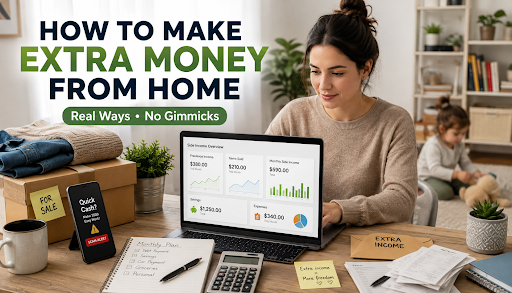
Alia works part-time and stays home with her two-year-old most days. Money got tight enough last winter that she started scrolling side gig ideas during naptime. Ten minutes in, she’d found three different “make $500 a day” ads, and every single one wanted her credit card number before telling her what the job even was. She closed the tab and didn’t touch the idea again for a month. That’s the actual problem with most advice on how to make extra money from home. Half of it is a scam wearing a nicer outfit. The other half is a listicle with forty ideas and zero honesty about which ones pay anything real. Start With What’s Already Sitting in Your House Before you sign up for anything, look around. Unused stuff in the closet, tools in the garage nobody’s touched since a move-in day years ago, and kids’ clothes that stopped fitting months ago. Selling this on Facebook Marketplace or a local buy-sell app is about as close to free money as it gets, since you already own the thing. You just need decent photos and a price that isn’t insulting. Alia sold a stroller and a box of baby gear she’d been meaning to donate for a year. One Saturday afternoon, $210. Not life-changing. It covered a month of groceries, though, and cost her nothing but a couple of hours she wasn’t using anyway. Turn a Skill Into Something That Actually Pays If you’ve got a skill someone would pay for, it’s almost always worth more per hour than surveys or task apps.Writing, accounting, graphic designing, teaching, even sorting out someone’s wardrobe for money if it’s something you’re good at. All these tasks can be found on freelance websites by people looking for such work, and even the beginner rates go up to $20 to $30 per hour. This route is slower to get moving. The first client is brutal to land, honestly. It gets easier after that, mostly because referrals start doing the work you used to do yourself. How to Tell a Real Gig From a Scam Most articles skip this part entirely, which is a problem given how common it’s gotten. The FTC has flagged a sharp rise in what it calls task scams: someone messages you out of nowhere about simple online work, pays a small amount early to build trust, then asks you to put your own money in for “bigger tasks” that never actually pay out. Reports of this exact pattern went from basically zero a few years ago to tens of thousands within a single year, according to a recent FTC data spotlight. Two things cut through most of it. A real employer never asks you to pay for training or a starter kit before you start. And nobody legitimate sends you a check, then asks you to wire part of it back or buy gift cards with it; that’s a fake check scam every single time. If a message shows up unprompted on text or WhatsApp promising fast money for easy tasks, don’t even entertain it. The FTC’s guide on side hustle scams is worth five minutes before saying yes to anything that found you instead of the other way around. What This Actually Adds Up To Numbers here get thrown around loosely, so let’s be honest about ranges instead. However, selling goods will soon end; one day you will just get rid of everything that can be sold. As far as freelancing is concerned, you can make $200 to $600 a month depending on how much time and effort you invest in it (as long as you have got a customer). The earnings from completing tasks and taking surveys are the lowest (from $3 to $8 an hour). Alia landed on a mix that works for her. She sells items when she has them and picks up two regular bookkeeping clients through a freelance platform, roughly $380 a month for about six hours of work a week. Not a full income by any stretch. It covers her car payment with a little left over, and that’s enough to matter. The Tax Part Nobody Wants to Think About Extra income is still income, whether it feels like it or not. Once your self-employment earnings pass $400 in a year, you’re generally required to report it, cash or app payments included. Keeping a running total from day one beats scrambling in April. The IRS self-employed tax center spells out what counts in language that doesn’t require a degree to parse. Keep Track of It, or It Just Vanishes Untracked extra income has a habit of disappearing into random spending without you ever noticing where it went. FinanceCash has a free tracker built specifically for side income, so you can actually see what’s coming in from where instead of digging through bank statements later. Pair it with their budget planner to decide upfront where the money’s headed debt, savings, or just some breathing room and a side income calculator that shows what a few extra hours a week actually turns into over a year. The Bottom Line How to make extra money from home doesn’t require chasing every ad that lands in your inbox. Start with what you already own. Build toward a skill-based gig if you’ve got one. Anything that demands upfront payment should automatically be an absolute no for you. Just record whatever comes in, declare truthfully and watch it grow gradually rather than hoping that it replaces your paycheck next month. Frequently Asked Questions Is side income required to be reported to the IRS? Yes. Self-employment income in excess of $400 in any year is required to be reported to the Internal Revenue Service even if it’s paid in cash or via an app. How do I identify scams among work-from-home jobs? If a job requires payments for training or starter kit, or approaches me out of the blue with promises of quick and easy cash, ignore it. What kind of
The Zero-Based Budgeting Method: Give Every Dollar a Job
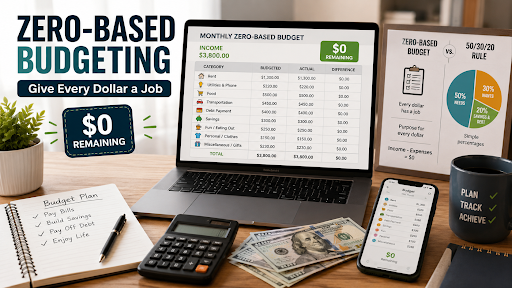
Maria gets paid on the first of the month. By the twentieth, her bank account is almost empty. She can’t say where the money went. Rent, sure. Food, sure. The rest is just a blur of coffee runs and random store trips. I’ve been Maria. Most people have. That gap between “I make good money” and “I have no clue where it goes” is what the zero-based budgeting method fixes. Here’s the idea. You take your money and give every dollar a job before the month starts. Rent gets a job. Food gets a job. Even your fun money gets a job, deliberately, not by accident. When you add it all up, you land on zero. Not because you spent every cent, but because every dollar savings included has somewhere to go. What Is the Zero-Based Budgeting Method? The zero-based budgeting method income minus spending lands on zero. Companies were doing this back in the 1970s, actually. The whole point was to make managers explain every cost instead of just rolling last year’s numbers forwards. People later used the same idea for their own money. It works just as well for a paycheck as it does for a company. Here’s the part that makes it different from a normal budget. Nothing is on autopilot. You don’t assume last month’s plan still fits. You build a new one from scratch each month, based on what’s really coming in and going out. How to Make a Zero-Based Budget Making one isn’t about hard math. Start with your total income for the month. If your paychecks change, use the lowest number you might get. That way you won’t come up short. Next, write down every bill you already know is coming. Rent, power, food, gas, insurance, and any debt payments. These get paid first, since they keep the lights on. Savings counts too, and this is the part people skip. Your emergency fund isn’t an extra. It’s a real line item, just like rent. Once your bills and savings are covered, split what’s left across the fun stuff. Eating out, hobbies, subscriptions. Keep going until the math hits zero. Then track it as the month goes on. Move money around if you need to. If food costs more than planned, pull from a spot that has room. Don’t just guess and hope. A Zero-Based Budgeting Example Take Marcus. He lives in Columbus, Ohio, and brings home $3,800 a month. His budget might look like this. Rent takes $1,300. Power and phone cost $220. Food gets $500. His car payment and gas add up to $450. He puts $400 toward a credit card he’s paying off. Another $300 goes into savings. Fun stuff and eating out get $250. Clothes and personal spending get $150. Everything else, including gifts and smaller purchases, will receive the remaining $230. Summarizing everything, you get $3,800.That matches his income to the dollar. Nothing is floating around, waiting to get spent on something he’ll forget by Friday. If Marcus gets a bonus next month, that bonus needs a job too. Maybe an extra debt payoff or a bigger deposit into savings. Want to try it with your own numbers? We have a zero-based budgeting calculator which calculates all for you while entering data. Zero-Based Budget vs. 50/30/20 The 50/30/20 rule splits your money into three parts. Fifty percent for needs, thirty percent for wants, and twenty percent for savings and debt. It’s fast. It’s easy to remember. That’s why so many people start here. A zero-based budget asks more from you. But it gives you more control in return. Instead of big buckets, every dollar gets its own job. This helps most if your income changes a lot, your debt is high, or you’re saving for something with a deadline. Round numbers don’t always match real bills. New to budgeting? Start with 50/30/20. Already tried it and still feel stuck? The zero-based budgeting method will likely get you further. Every Dollar Has a Job You will come across this saying many times, and it works because of its true meaning. If each dollar has a function, you do not have any spare money. Cash that might get spent on something you’ll forget in a week. Every dollar goes toward a bill, a goal, or spending you actually planned. Simple as that. It also stops the guilt. You’re not standing in line wondering if you can afford something. You already decided, back when you made the budget, how much that spot had. Common Mistakes to Avoid The biggest mistake is making the budget once and never touching it again. This method only works if you rebuild it every month. Bills and income change more than people think. Second, people forget the odd expenses. Car repairs, birthdays, and yearly subscriptions. Then the bill shows up and it’s in panic mode. Give annual and irregular expenses their own line, even a small one, so they’re not ambushing you every few months. And here’s the one that gets almost everyone: the fun-money category gets set too tight, and by week two the whole thing’s abandoned. Leave room to actually enjoy your money a little. Is a Zero-Based Budget Right for You? Do you like having a plan? Don’t mind spending twenty minutes a month on it? Then this will likely work well for you. Would you rather set something up once and mostly forget about it? A simpler method might fit better, at least to start. Either way, this month is a fine time to try it. Pick your income number. List your bills. Give the leftover dollars a job. Our free budgeting worksheet can help you start right now. You might be surprised where your money has really been going. The Consumer Financial Protection Bureau says tracking both income and spending is the first real step toward a budget that lasts past week one. That’s exactly what the zero-based method makes you do from day one. Try it for one month. Then

Best Investment Apps for Beginners: A Simple 2026 Guide
The first person I got asked this question from last month was Dana, my friend who had about $200 in her savings account at the time. After trying to read two beginner guides to investments, she found herself more lost than ever among terms such as expense ratios and robo advisor allocation without even trying an app yet. Here is the quick answer to that question, which I told her through text messages. When looking for the best investment apps for beginners, don’t bother yourself with all the buzzwords. You don’t need a degree in finance, just an application that suits your existing behaviors when it comes to dealing with finances because no app can help you if you never use it. What Actually Makes an App Good for Beginners Some people want to pick their own stocks and feel like they’re steering the ship. Other people would rather set it and forget it, which, honestly, is most of us. A decent beginner app should have zero account minimum, zero trading fees, and something that teaches you along the way even if that’s just a glossary you tap on when you hit a word you don’t recognize. Fractional shares matter more than people realize, too. Without them, you’d need $200 just to own one share of a company like Apple. With them, $5 buys you a sliver of it. That’s the whole game changer for anyone starting small. Fidelity: Best for Learning as You Go Fidelity’s been around since before most of us were born, and its education section is where that history actually pays off.Guides, videos, calculators that teach you why the market behaves the way it does rather than where to click “buy.” No commission on stock or ETF trades. I sent Dana here first, honestly, because she’s the type who wants to understand what she’s doing, not just do it blindly. If that’s you too, Fidelity is probably the most patient of the investing apps for beginners on this list. Acorns: Best for Micro-Investing Acorns beats all others on sheer laziness, and I say that as a compliment. Connect your debit card and everything you spend is rounded up to the nearest dollar. Go out for a $3.50 coffee and Acorns automatically deposits the other fifty cents. It sounds too small to matter. It isn’t. Over a year, those quarters and dimes add up faster than most people expect, which is why Acorns is one of the more popular micro-investing apps around you; you barely feel yourself doing it. The catch is the fee. It starts around $3 a month, and on a tiny balance, that’s not nothing. SoFi Invest: Best for Hands-Off Beginners SoFi Invest answers a handful of questions about your goals and how much risk keeps you up at night, then builds and manages the portfolio itself. You don’t touch it much after that. It’s one of the more approachable robo-advisor apps out there, and it throws in free financial planning calls, which plenty of competitors charge extra for. If the idea of picking your own stocks makes your stomach turn a little, this is your lane. No shame in that. Robinhood: Best for Simple Stock Trading Robinhood is the reason “commission-free” became the default instead of the exception. Its app still feels like the cleanest way to buy and sell a stock without wading through charts you can’t read yet. If you want to pick your own investments and skip the clutter, it’s one of the best stock trading apps for someone who’s never traded before. Just don’t expect much hand-holding. There’s no built-in education center like Fidelity’s Robinhood, so assume you’ll figure it out as you go. How Much Money Do You Actually Need? Almost none, which surprises people every time I say it. Fidelity, Robinhood, Acorns, SoFi, and Charles Schwab all let you start with $1. What actually matters is showing up month after month, even if it’s just $25 at a time. I’ll take someone investing $25 a month for five straight years over someone who waited around trying to save up $1,000 first. The waiting is the expensive part. Consistency does more heavy lifting than a big first deposit ever will. Apps to Start Investing With Little Money Tight budget? Look for three things: no minimum deposit, no monthly fee eating your balance, and fractional shares. Acorns and SoFi both hold up well here. So does Fidelity, if you don’t care about the round-up gimmick. Forget about the search for the ideal app in theory. Choose the app that you will keep using in reality; this is the only real quality that matters. Getting Started the Right Way Now that you have chosen your app, do not overthink the first step. Set up automatic deposits, even tiny ones, and put your money into a broad index fund instead of trying to guess which stock takes off next. Dana went with Fidelity, set $50 a month on autopilot, and hasn’t touched the settings since. We’ve got more breakdowns like this one over at financecash. info if you want to keep digging before you commit. Investing carries risk no matter which app you pick, and nothing here guarantees a return. Before you put real money in, it’s worth skimming the investor education pages the U.S. Securities and Exchange Commission publishes and confirming your app is registered with FINRA. The Bottom Line There isn’t some perfect application out there waiting to be found; rather, there’s only the one that suits your unique relationship with money: automatic if you’re prone to forgetting, hands-on if you enjoy control, and minimalistic if distractions lead you to shut down the app before using it. Start small. Stay consistent. Everything else, time handles for you. If you want more no-fluff guides like this one, financecash. Info has you covered. FAQ Do I need a lot of money to start investing? No. Most beginner apps, including Fidelity, Robinhood, and SoFi, let you start with $1 thanks to